Insights · Working with an agency · September 2026
The access and inputs your SEO agency needs to start work
The kickoff call is booked, and the agency sends a list of logins it needs. Some of those accounts hold customer data. One wrong permission can let someone publish to your homepage or remove your own team from an account. What should you grant, and at what level?

Give each person their own access, at the lowest level that lets them do the agreed work, and keep ownership inside your company. For most engagements that means full user in Search Console, a read-and-analyze role in Google Analytics, edit rights in Tag Manager without publishing, an editor-level account in your CMS and a ticket route to your developer. The inputs that aren't logins matter just as much: product facts, buyer questions, approvers and dates.
Two rules before the list
First, give each person their own account. Invite them by email to each tool. Shared passwords make it impossible to see who changed what, and impossible to remove one person without locking out everyone else. Search Console, Google Analytics and Tag Manager all add people by the email address of their Google account, with a permission level you choose.
Second, keep ownership. Leave the top-level role for each account with someone on your payroll. In Search Console, "a property must have at least one verified owner, or no users will have access to the property." Search Console Help. If the only verified owner is an agency employee who leaves, you have a problem that has nothing to do with SEO.
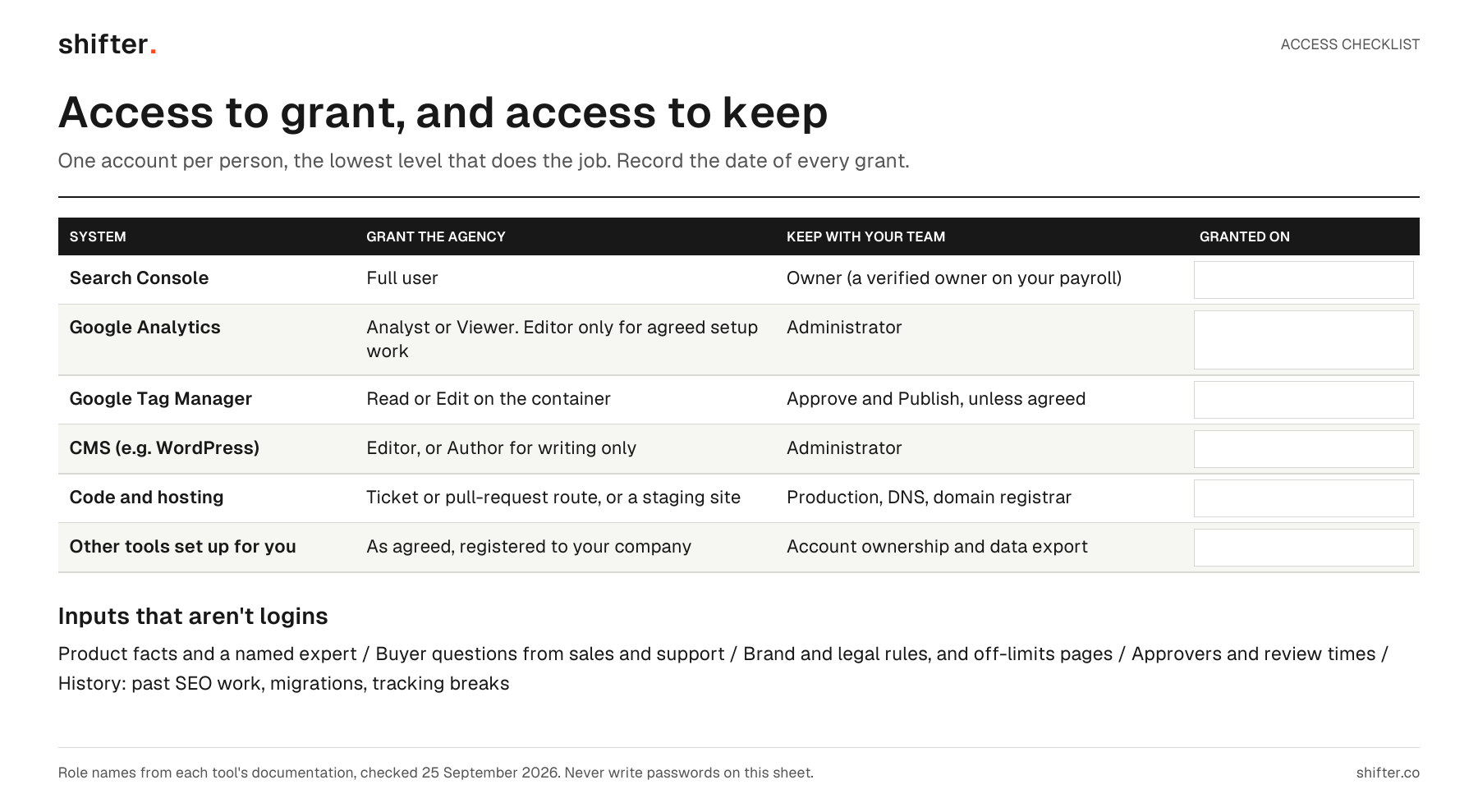
Read the visual as text
- Search Console: grant Full user; keep Owner, with a verified owner on your payroll.
- Google Analytics: grant Analyst or Viewer, Editor only for agreed setup work; keep Administrator.
- Google Tag Manager: grant Read or Edit on the container; keep Approve and Publish unless agreed.
- CMS such as WordPress: grant Editor, or Author for writing only; keep Administrator.
- Code and hosting: a ticket or pull-request route, or a staging site; keep production, DNS and the domain registrar.
- Other tools set up for you: as agreed and registered to your company; keep account ownership and data export.
- Each row has a blank "granted on" field. Inputs that are not logins: product facts and a named expert, buyer questions from sales and support, brand and legal rules and off-limits pages, approvers and review times, and history of past SEO work, migrations and tracking breaks.
The access list
| System | Grant the agency | Keep with your team | Why |
|---|---|---|---|
| Search Console | Full user | Owner | Full users can view all data and take some actions. Owners can also add and remove users. |
| Google Analytics | Analyst or Viewer, Editor only for agreed setup work | Administrator | Reporting needs data access, not control of the property. |
| Google Tag Manager | Read or Edit on the container | Approve and Publish, unless agreed | Changes can be prepared and reviewed before anything goes live. |
| CMS (e.g. WordPress) | Editor, or Author for writing only | Administrator | An Editor can publish and manage other people's posts, so choose it deliberately. |
| Code and hosting | A ticket or pull-request route to your developer, or a staging site | Production, DNS and the domain registrar | Technical fixes go through the people responsible for the site. |
The table uses each tool's own role names. Google Analytics lists five roles: Administrator, Editor, Marketer, Analyst and Viewer. Google Analytics Help. In Tag Manager, "at the container level, users can be granted read, edit, approve, or publish rights." Tag Manager Help. In WordPress, an Editor is "somebody who can publish and manage posts including the posts of other users," while an Author can publish and manage only their own. WordPress documentation. Other CMSs use different names, so match the level, not the label.
Grant more only for a named task, and write down when it ends. "Editor in Analytics for two weeks to fix conversion tracking" is a decision. "Admin everywhere to move faster" isn't.
The inputs that aren't logins
Access lets the agency see your site. Inputs let it write about your product accurately. Prepare these for the first week:
- Product facts: current documentation, pricing rules, plan limits and integrations, with a named person who can answer questions.
- Buyer questions: notes from sales calls, demo requests, support tickets and objections you hear often. Those notes are where your first topics usually come from.
- Rules: brand and legal requirements, claims you can't make, and pages that are off limits.
- Approvers: who reviews what, and how quickly. "Product lead reviews technical claims within three working days" prevents most delays.
- History: previous SEO work, past migrations and anything that broke tracking.
A fictional example
A SaaS company prepares for kickoff in one afternoon. The head of marketing invites the agency's two people as full users in Search Console and Analysts in Google Analytics. She adds them with Edit rights to the Tag Manager container and creates Author accounts in the CMS. A shared tracker lists every grant, with a date to review it.
Separately, the product lead records a 20-minute walkthrough of the pricing rules, and sales exports the last 30 demo-request notes. The agency starts writing in week one instead of waiting for answers.
Keep a record, and plan the exit now
Write every grant in one place: the person, the tool, the level and the date. It takes minutes, and it's the list you'll need when the engagement ends or a person changes. What your SEO agency should hand back when you leave covers the rest of that exit list. Your first month with an SEO agency covers what should happen once access is in place.
FAQ
What access does an SEO agency need to start work?
Usually full user in Search Console, an Analyst or Viewer role in Google Analytics, Read or Edit on your Tag Manager container, an Editor or Author account in your CMS and a ticket route to your developer. Grant each person their own access and keep ownership with your team.
Should I give an SEO agency admin access?
Not by default. Keep the owner and administrator roles with someone on your payroll, and grant a higher level only for a named task with an end date. Search Console needs at least one verified owner, so make sure that owner is yours.
How do I give an SEO agency access without sharing passwords?
Invite each person by email in each tool and choose their permission level there. Search Console, Google Analytics and Tag Manager all add people by the email address of their Google account, so you can remove one person without affecting anyone else.