Insights · Scope & pricing · September 2026
When to increase your SEO budget, and what to check first
Six months in, your agency proposes doubling the scope. The report shows more pages published and a rising line. It sounds like momentum. Before you agree, check whether more money would buy more of something that works, or more of something nobody has tested yet.

Increase the budget when three things are true: the current scope is being delivered, the pages are reaching the right buyers, and there's a backlog of validated work the current budget can't cover. If any of these is missing, fix that first. More budget won't.
Check 1: is the current scope being delivered?
Start with the agreement you already have. Compare what was promised each month with what was published or implemented, using the definition of "delivered" in your contract. Thirty articles a month shows how to test that definition.
If delivery is behind, find where. Work waiting on the provider is their problem to fix at the current price. Work waiting on your approvals is a capacity problem on your side, and a bigger budget would make it worse.
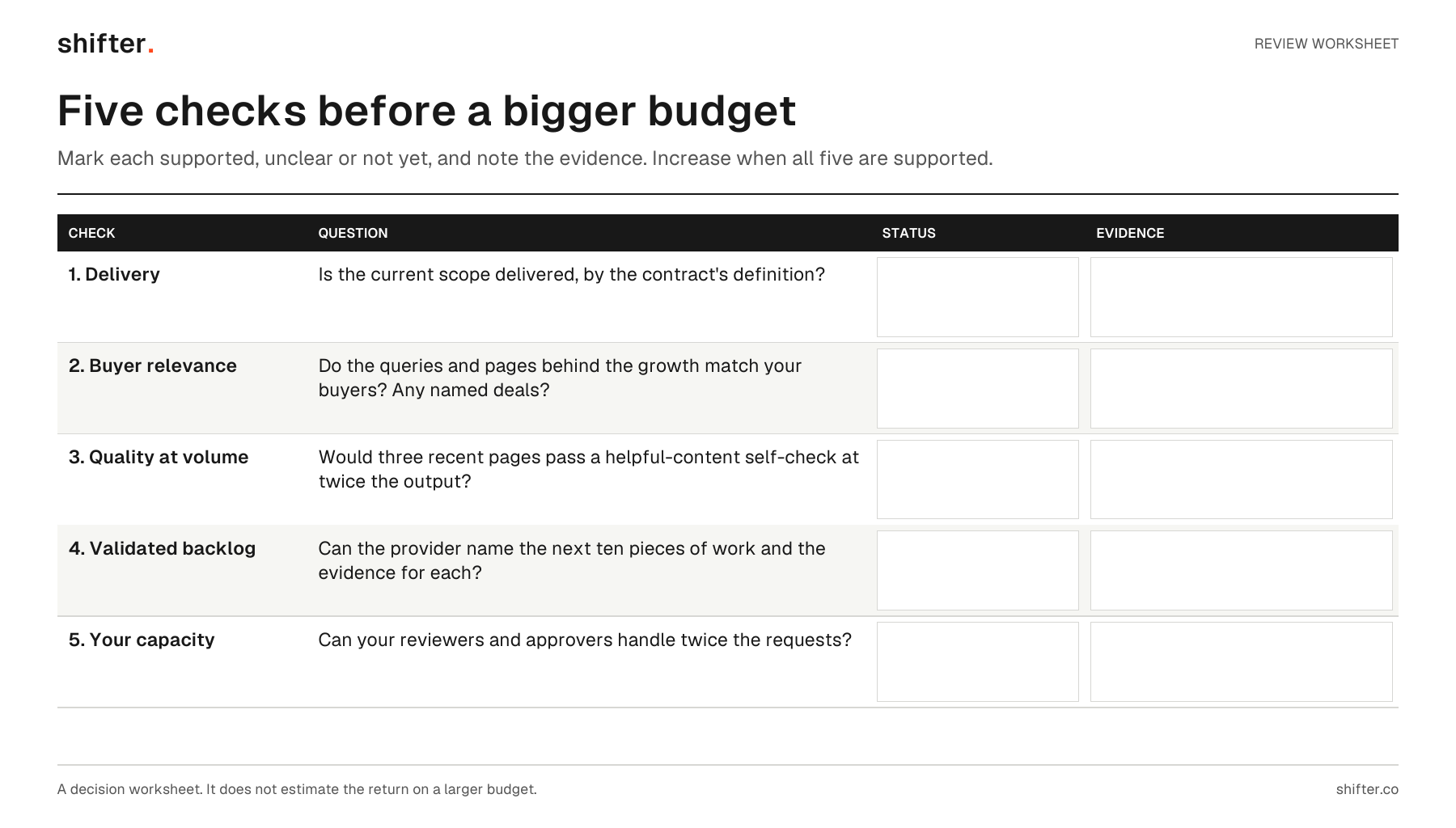
Read the visual as text
- 1. Delivery: is the current scope delivered, by the contract's definition?
- 2. Buyer relevance: do the queries and pages behind the growth match your buyers? Any named deals?
- 3. Quality at volume: would three recent pages pass a helpful-content self-check at twice the output?
- 4. Validated backlog: can the provider name the next ten pieces of work and the evidence for each?
- 5. Your capacity: can your reviewers and approvers handle twice the requests?
- Each check has blank fields for status (supported, unclear or not yet) and evidence. Increase the budget when all five are supported.
Check 2: are the pages reaching the right buyers?
Traffic that grows on the wrong searches doesn't justify more spending. Open Search Console and look at the queries and pages behind the growth. Use a fair comparison: Google suggests using weekly or monthly granularity "when comparing two date ranges." Search Console Help.
Then ask your sales team. Are the new pages the ones prospects mention, send to colleagues or arrive on before a demo request? One named deal that started on a page is worth more than a percentage on a chart. Neither proves the whole program works, but together they tell you whether the work points in the right direction.
Check 3: would the pages pass a quality bar at twice the volume?
Google's guidance on helpful content includes self-assessment questions, such as: "Does the content provide original information, reporting, research, or analysis?" Google Search Central. Pick three recent pages and answer the questions honestly.
Volume has a limit. Google's spam policies define scaled content abuse as "when many pages are generated for the primary purpose of manipulating search rankings and not helping users." Google spam policies. More articles aren't a problem in themselves. More articles that repeat each other, or exist mainly to target a phrase, are.
If today's pages barely pass, doubling the output usually lowers the average. Fix the process before you scale it.
Check 4: is there validated work waiting?
A good reason to spend more is a backlog you've already checked: buyer questions you know matter, with no page yet, or technical fixes that block pages from being found. Ask your provider for the list, and for the evidence behind each item.
A weak reason is "more of everything." If the proposal can't name the next ten pieces of work and why each one matters, the extra budget has no plan yet.
Check 5: can your team keep up?
Every article and page update needs something from you: product facts, a review, an approval, a developer's time. Count what the current scope asks of your team each month, then double it. If the people involved can't give that time, the extra work will queue behind them.
A fictional example
A SaaS company's agency has delivered its agreed 30 articles each month for five months. Search Console shows the growth coming from comparison and integration pages, and two recent deals started on those pages. Product review takes a week per batch, and the queue is empty. There's a list of 14 buyer questions from sales calls with no page yet.
That's a strong case for more budget, aimed at those 14 questions. The same company with a two-week approval queue, or with growth coming mostly from a glossary of general terms, should fix those problems first.
A worksheet for the decision
Before approving an increase, write one line for each check: delivery against scope, buyer relevance, quality at the current volume, validated backlog, and your team's capacity. Mark each as supported, unclear or not yet. Increase the budget when all five are supported. If any is unclear, spend the next month making it clear.
If you're weighing a first budget rather than a bigger one, what $1,800 a month buys covers what a defined scope includes. What your SEO report should show covers the evidence behind each check.
FAQ
When is it worth increasing an SEO budget?
When the current scope is being delivered, the pages are reaching the right buyers, and there's a backlog of validated work the current budget can't cover. If any of these is missing, fix it first.
Will publishing more articles improve SEO?
Not by itself. Google's spam policies describe scaled content abuse as many pages generated mainly to manipulate rankings rather than help users. More pages help when each one answers a distinct buyer question well.
What should I check before approving a bigger SEO scope?
Check delivery against the current scope, whether the queries and pages behind the growth match your buyers, and whether recent pages meet a quality bar. Then ask for the list of validated work the extra budget would pay for, and whether your team can review twice the output.