Insights · Content planning · October 2026
Update an existing page or write a new one?
Your integration guide from last year still gets impressions in Search Console. Its screenshots show an old settings screen, though, and two steps no longer work. A colleague wants a new article on the updated integration instead, because a new post shows up on the content calendar and an edit doesn't. Fix the page you have, or publish another?

Update the existing page when it answers the same buyer question for the same reader and can be made correct and more complete. Write a new page only when the question, the reader or the page's job is different. If two of your pages answer the same question for the same reader, merge them. Either way, an update changes the content; a new date alone doesn't count.
Why another article isn't the safe default
A new article feels safer because the old page stays untouched. Yet Google's guide to AI features in Search says "a high quantity of pages doesn't make a website higher quality or more relevant to users." Google Search Central.
Google says "Scaled content abuse is when many pages are generated for the primary purpose of manipulating search rankings and not helping users." Google's spam policies. A second page restating the first, to catch another phrasing of the same question, edges toward that abuse.
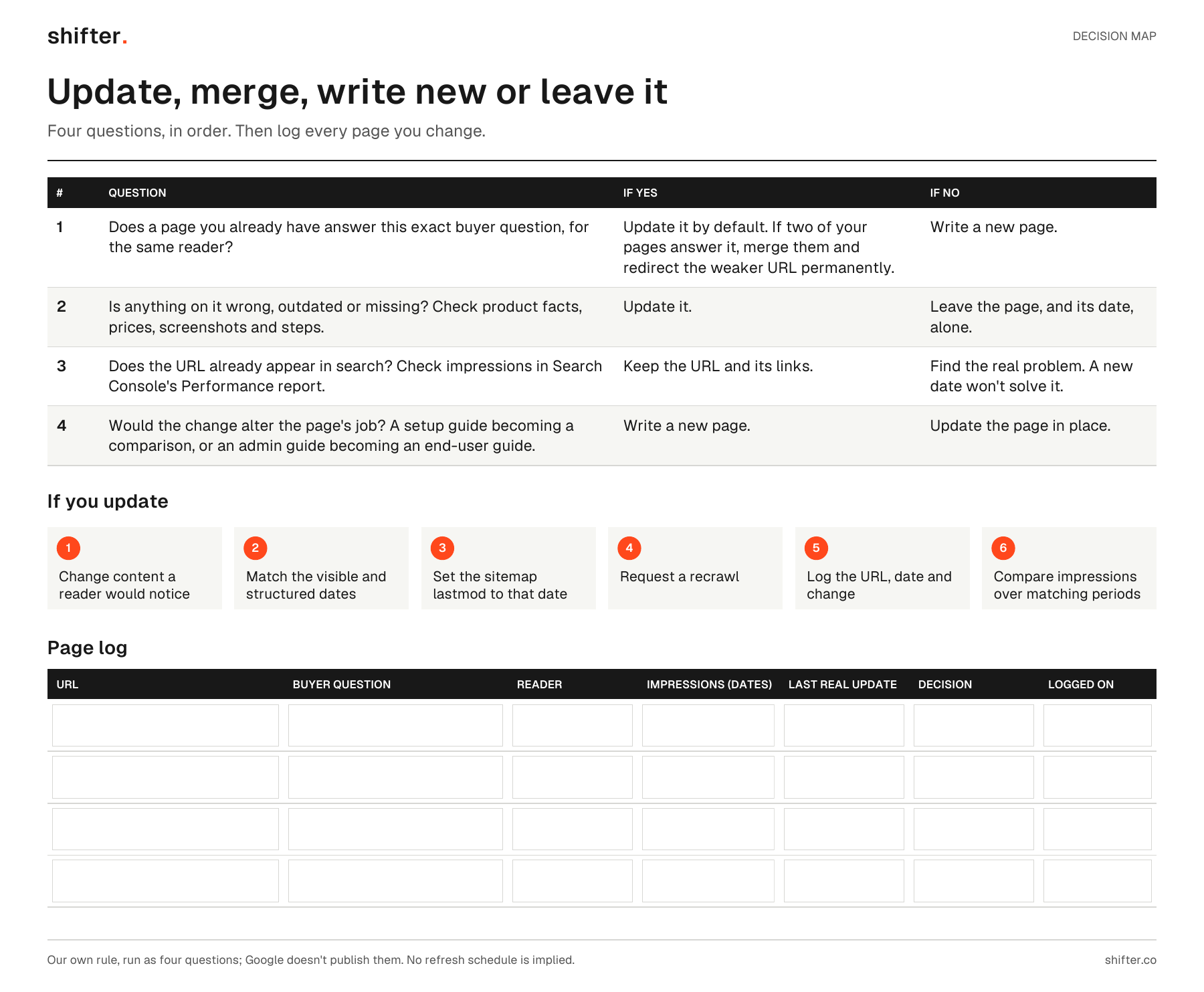
Read the visual as text
- 1. Does a page you already have answer this exact buyer question, for the same reader? If yes, update it by default; if two of your pages answer it, merge them and redirect the weaker URL permanently. If no, write a new page.
- 2. Is anything on it wrong, outdated or missing (product facts, prices, screenshots, steps)? If yes, update it. If no, leave the page and its date alone.
- 3. Does the URL already appear in search (impressions in Search Console's Performance report)? If yes, keep the URL and its links. If no, find the real problem; a new date won't solve it.
- 4. Would the change alter the page's job, such as a setup guide becoming a comparison? If yes, write a new page. If no, update the page in place.
- If you update: change content a reader would notice; match the visible and structured dates; set the sitemap lastmod to that date; request a recrawl; log the URL, date and change; compare impressions over matching periods.
- Page log: blank fillable rows for URL, buyer question, reader, impressions with dates, last real update, decision and the date logged.
Four questions that decide it
Our own rule:
"If the page already answers the same buyer question and has some traction, update it and keep the URL. If it's a different question, with a different buyer, stage or intent, write a new page. One question, one page."
Fabian Cid, founder of Shifter
We run it as four questions, in order; Google doesn't publish them.
- Does a page you already have answer this exact buyer question, for the same reader? If yes, update it by default.
- Is anything on it wrong, outdated or missing? Check product facts, prices, screenshots and steps. If nothing has changed and it answers well, leave it.
- Does the page already appear in search? Find the URL in Search Console's Performance report, where impressions mean "How many times your site appeared in Search results." Search Console Help. Any impressions make the URL and its links worth keeping. A page with none has a problem that a new date won't solve.
- Would the change alter the page's job? Turning a setup guide into a comparison, or an admin guide into one for end users, makes a new page, even when the topic sounds the same.
There are four outcomes: update, merge, write new or leave it.
What counts as an update
An update is a change a reader would notice, such as a corrected fact or an added answer. Among Google's warning signs: "Are you changing the date of pages to make them seem fresh when the content has not substantially changed?" Google Search Central.
Record a real change consistently. Google says "our systems look at several factors to determine our best estimate of when a page was published or significantly updated," and asks that the visible and structured dates match. Google Search Central. For sitemaps, "The
Freshness only matters for some searches. Google says its "query deserves freshness" systems are "designed to show fresher content for queries where it would be expected." Google Search Central. We've found no search engine that recommends a fixed refresh schedule.
When to merge two pages
Merge when two of your pages answer the same question for the same reader. Keep the stronger URL, fold in anything useful from the other, and redirect the old URL permanently. With a permanent redirect, Google says, "the indexing pipeline uses the redirect as a signal that the redirect target should be canonical." Google Search Central. A single preferred URL lets search engines "consolidate the signals they have for the individual URLs (such as links to them) into a single, preferred URL." Google Search Central.
Pages for different readers can both stay, linked to each other. To check whether two of yours overlap, see when two articles answer the same question.
When a new page is the right call
Write a new page for a new question, a different reader or a different job. Google's AI features guide says content people find unique, compelling and useful "will likely influence your website's presence in generative AI search in the long run more than any of the other suggestions in this guide." Google Search Central. With more new questions than time, use how to choose the next six topics to pick which to write first.
After you update, log it and wait
Request a recrawl of the changed pages. Google says "Crawling can take anywhere from a few days to a few weeks," and "Requesting a crawl does not guarantee that inclusion in search results will happen instantly or even at all." Google Search Central. Log the URL, the date and what changed. Then compare that URL's impressions over matching periods before and after.
A fictional example
A fictional scheduling tool for field-service teams has three pages about its calendar integration: a 2024 setup guide for admins, an older blog post covering the same steps, and a pricing FAQ. Sales keeps hearing a question none of them answers. Does the integration work when a whole team shares one calendar?
The setup guide has impressions, but two steps and every screenshot are out of date. It gets updated, with matching dates and a log entry. The older post answers the same question for the same admins, so it's merged into the guide and redirected. Nobody touches the pricing FAQ or its date, since it's still correct. The shared-calendar question, from team leads deciding whether to buy, gets a new page.
FAQ
When should we update a page instead of writing a new article?
Update when an existing page answers the same buyer question for the same reader and can be made correct and more complete. Write a new page when the question, the reader or the page's job is different.
Does changing the date on a page help it rank?
Not on its own. Google lists changing dates to make pages seem fresh, without substantially changing the content, as a warning sign. Change the page and sitemap dates only after a real content change.
Should we merge old posts that overlap?
Merge two pages when they answer the same question for the same reader. Keep the stronger URL, move the useful content into it and redirect the old URL permanently. Pages that serve different readers can both stay, linked to each other.