Insights · Your website · September 2026
What buyers need to find on a SaaS product page
A buyer may understand your headline and still be unable to recommend the product to a colleague. They need to explain how it fits their work, what it replaces and what adopting it would involve.

Review your product page against that conversation. Which answers could the buyer take into an internal meeting, and which would they have to guess? Make a poor fit easy to identify, too. Address the limitations that matter to your intended buyer, even when they give a prospect a reason to leave.
To make that review concrete, consider a fictional product: an approval tool for B2B marketing teams. In this example, it routes draft material to designated reviewers and records their decisions. The features below are illustrative, not claims about a real company.
Start with the job the buyer recognizes
Suppose the opening sentence says, “Transform collaboration with a powerful workflow platform.” A marketing lead still has to work out whether it handles campaign approvals, project planning or file storage.
A clearer description would be: “Send campaign drafts to the right reviewers and see which approvals are still outstanding.” Follow it with the relevant context: this example is intended for marketing teams whose campaign sign-offs involve several colleagues.
Then show the scope. If the product manages approvals but does not create campaign assets, say where that work happens. Help readers distinguish capabilities they can use today from features that are planned or require another product.
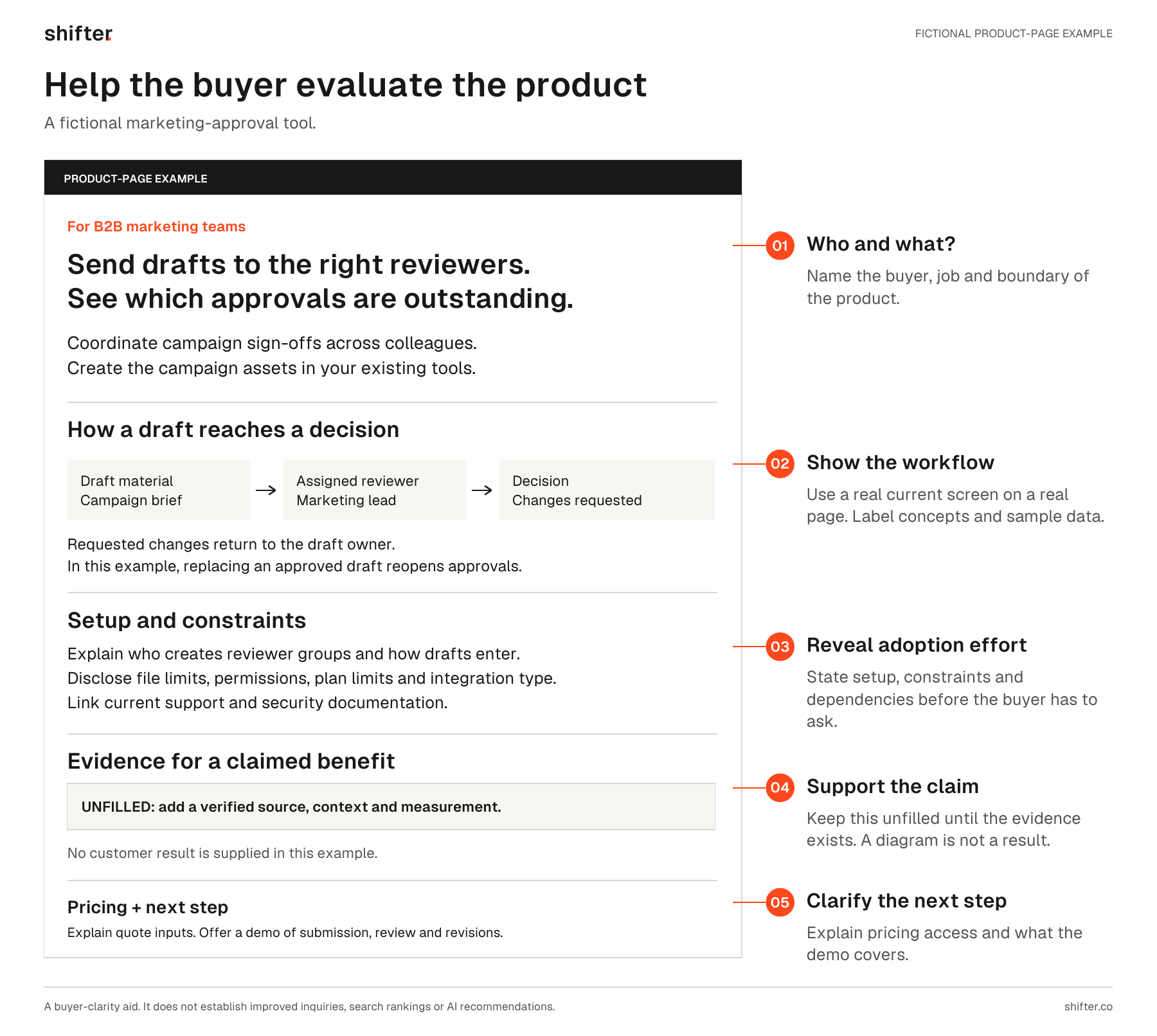
Read the visual as text
- Fictional product-page concept for a marketing-approval tool; no real company or customer is represented.
- Who and what: B2B marketing teams can send drafts to reviewers and see outstanding approvals. Campaign assets are created in existing tools. Name the buyer, job and scope boundary.
- Workflow shown: draft material (campaign brief), assigned reviewer (marketing lead), decision (changes requested). Requested changes return to the draft owner. In this example, replacing an approved draft reopens approvals. On a real page, show a current real screen and label sample data.
- Adoption: explain who creates reviewer groups and how drafts enter; disclose file limits, permissions, plan limits and integration type; link current support and security documentation.
- Evidence area is visibly UNFILLED. Add a verified source, context and measurement for a claimed benefit. No customer result is provided, and a diagram is not result evidence.
- Pricing and next step: explain quote inputs and offer a demo of submission, review and revisions.
- This is an editorial buyer-clarity aid, not proof of improved inquiries, search rankings or AI recommendations.
Show what happens after the first click
For this tool, a useful visual could show a campaign draft awaiting a legal reviewer while the marketing reviewer has already approved it. Labels identify the draft version, the outstanding decision and the person responsible for the next action. The reader can see why the campaign is still waiting.
Show an exception as well as the normal path. Suppose this example product requires a fresh approval when someone replaces an approved draft. State that beside the version history: “Replacing the draft reopens its approvals.” A buyer can now compare that behavior with their own sign-off rules.
Use a current real product when creating your actual page. If a visual is a concept, sample account or planned screen, label it. Place the important explanation in ordinary page text as well as the visual, and provide descriptive alternative text where needed.
Make adoption effort visible
The buyer needs to know what their team will have to do. Describe the required setup, who normally owns it and any dependencies on other systems. Distinguish a native integration from a file import, an API connection or a manual step.
In our example, the marketing administrator creates reviewer groups and users upload draft files. The tool records approvals; it does not edit the campaign assets. A team looking to edit copy inside the approval tool can rule it out on that requirement. Keep that limitation beside the workflow, where the buyer is deciding whether it fits. Avoid promising a setup time unless you can support it and state the conditions.
Give constraints a clear home. Explain relevant file limits, permission controls, available support and where buyers can inspect security documentation. For a US or UK audience, make currency, billing period and any relevant service-location limits explicit. A feature hidden in a premium plan should be identified before the buyer assumes it is included.
If you cannot publish a fixed price, explain what determines the quote and what information you need to provide one. Here, a page could ask for the number of reviewers if that affects the price. Use the inputs your actual pricing requires; do not ask buyers to book a call just to discover which details they need to bring.
Put evidence beside the claim it supports
An assertion that the tool reduces approval delays needs evidence beyond a tidy screenshot. If you have a relevant customer result, show the context, period, measurement and source. If you do not, demonstrate the actual workflow and describe its intended use without presenting the benefit as an observed outcome.
A customer logo does not explain whether that customer used this feature. A security statement should lead to the documentation that supports it. Keep examples and testimonials clearly attributable, and obtain permission where required.
Then make the next step specific. For the approval tool: “Bring a campaign draft to the demo. We’ll follow it from upload to sign-off and show what happens when the draft changes.” That tells a buyer what they can evaluate.
A trial should explain what the visitor can test and any material limits. A buyer checking an integration should be able to reach its documentation without starting the sales process again.
Check search access separately
These suggestions help organize a buyer's evaluation. Their effect on inquiries needs to be tested; they do not establish a ranking improvement or an AI recommendation.
Google's current guidance says pages need to be indexed and eligible for a search snippet, and the site must be included in Search generative AI features through Search Console. It does not require special schema, and eligibility does not guarantee inclusion. Have your website owner check the applicable indexing and inclusion settings. Google's generative AI search guide.
That technical check serves a different purpose from the editorial review: it establishes whether the page can be considered, while the copy helps a buyer understand the product.
Give the page to a colleague unfamiliar with its wording and ask them to recommend or reject the product for one specific use case. They should be able to point to the intended customer, the relevant workflow, a constraint and the next step. Stay quiet while they look; an explanation from you would hide a missing answer on the page.
Record each missing answer as a buyer question and assign someone to verify it. Fix the gaps that could change the buying decision first, then test the revised page with another reader.
FAQ
What should a SaaS product page include?
The job the product does and who it's for, what happens after the first click, the effort to adopt it (setup, owners, integrations and limits), evidence beside each claim, and a specific next step.
Should a product page mention limitations?
Yes, the ones that matter to your intended buyer. A limitation placed beside the workflow helps the right buyer decide, and lets the wrong one rule the product out early.
Will a clearer product page improve rankings or AI recommendations?
Not by itself. Clear copy helps a buyer evaluate the product. Whether the page can appear in Search or Google's AI features depends on indexing and eligibility, which your website owner should check separately.